Showing posts with label #Microsoft. Show all posts

Thursday, June 24, 2021

How to Check if Your Windows 10 PC Can Run Windows 11

Windows-11-hero.png?width=600&height=250
Windows 11 was officially announced as the latest version of Microsoft’s operating system on June 24, 2021. Naturally, you most likely want to know if your Windows 10 computer will be able to run the new update. Microsoft has a handy tool to help you check.

Read This Article on How-To Geek ›

Source: https://www.howtogeek.com/737021/how-to-check-if-your-windows-10-pc-can-run-windows-11/
Droolin’ Dog sniffed out this story and shared it with you.
The Article Was Written/Published By: Joe Fedewa


! #Headlines, #Computers, #Microsoft, #Newsfeed, #TechNews, #TechnologyNews, #TechSupport, #TechTips, #Windows, windows microsoft, #News

Friday, February 19, 2021

Why Are My Microsoft Edge Tabs Faded? How to Turn off Sleeping Tabs

microsoft-edge-sleeping-tabs.png?width=6
Starting in version 88, Microsoft Edge automatically enables its Sleeping Tabs feature for all users. Wondering why some of your tabs are faded in the Edge toolbar? Here’s how the Sleeping Tabs feature works (and how to turn it off).

Read This Article on How-To Geek ›

Source: https://www.howtogeek.com/713905/why-are-my-microsoft-edge-tabs-faded-how-to-turn-off-sleeping-tabs/
Droolin’ Dog sniffed out this story and shared it with you.
The Article Was Written/Published By: Khamosh Pathak


! #Headlines, #Apps, #BrowserWars, #Microsoft, #Newsfeed, #TechNews, #TechSupport, #TechTips, #News

Thursday, February 11, 2021

Volkswagen partners with Microsoft on automated cars

bdcbc8b0-6c4e-11eb-bf97-bff40b7d3a02Volkswagen Group is enlisting Microsoft’s help to speed up the development of autonomous driving systems, the company announced. It has already worked for several years with Microsoft on cloud computing for connected cars, but now it will expand that…

Source: https://www.engadget.com/volkswagen-group-teams-up-with-microsoft-on-automated-cars-105154799.html
Droolin’ Dog sniffed out this story and shared it with you.
The Article Was Written/Published By:


! #Headlines, #ArtificialIntelligence #AI, #BusinessNews, #Cars, #Engadget, #Microsoft, #Newsfeed, #SelfDrivingVehicles, #TechNews, #TechnologyNews, #News

Wednesday, January 20, 2021

How to Add a Signature in Outlook

Featured-Add-Signature-Outlook.jpg Most of us use a well-thought-out signature in our outgoing emails. It’s the trait of a professional, and the recipient takes you more seriously. Outlook offers diverse options in adding the signature of your choice. You can customize them further with images, business cards, hyperlinks, logos, and colorful backgrounds. Here is how to add a signature in Outlook, whether you’re using its webmail, desktop or mobile app. Adding a Signature in Outlook WebMail In the Webmail window, once you’re logged in, you can see a tiny gear icon on the top. Click to open a side panel… Read more14230478.gif

Source: https://tracking.feedpress.com/link/12555/14230478/how-to-add-signature-in-outlook
Droolin’ Dog sniffed out this story and shared it with you.
The Article Was Written/Published By: Sayak Boral


! #Headlines, #Apps, #Email, #Microsoft, #Newsfeed, #Office365, #Productivity, #TechNews, #TechSupport, #TechTips, #News

Tuesday, November 17, 2020

Microsoft’s Pluton chip upgrades the hardware security of Windows PCs

9e096580-2876-11eb-b8ff-a7c13ca1645aThe next Windows PC you buy could come with an advanced security co-processor that will protect your data from being stolen by hackers. Building on work it started with the Xbox One, on Tuesday Microsoft announced the existence of Pluton. It’s a new…

Source: https://www.engadget.com/microsoft-pluton-amd-intel-qualcomm-140051425.html
Droolin’ Dog sniffed out this story and shared it with you.
The Article Was Written/Published By:


! #Headlines, #Computers, #Cybersecurity, #Engadget, #ExtremeTech, #Hardware, #Microsoft, #Newsfeed, #TechNews, #TechnologyNews, #Windows, windows microsoft, #News

Friday, June 19, 2020

Microsoft built Japan’s contact-tracing app using Apple and Google tech

71b2afc0-b213-11ea-87e5-65cec512f482Japan is finally getting ready to launch its COVID-19 contact-tracing app, which officials hope will help prevent a second wave of infections. The app — expected to roll out this week — has been besieged with various legislative challenges since work…

Source: https://www.engadget.com/microsoft-built-japans-contacttracing-app-using-apple-and-google-tech-105556846.html
Droolin’ Dog sniffed out this story and shared it with you.
The Article Was Written/Published By:


! #Headlines, #Apple, #Apps, #CoronaVirus, #Engadget, #Google, #Medicine, #Microsoft, #SocialDistancing, #TechNews, Japan, #Coronavirus, #Health, #News, #Newsfeed, #WorldNews

Tuesday, June 9, 2020

Microsoft employees call for company to cancel its police contracts

gettyimages-928059862.jpeg?w=600

In a new letter addressed to executive leadership, a group of Microsoft employees is demanding that the Seattle-area company end its existing law enforcement contracts.

As reported by OneZero, the letter, sent via email, emerged out of a Facebook group for young employees at the company. It addresses Microsoft CEO Satya Nadella and Executive Vice President Kurt DelBene directly and was copied to 250 supporters. In the past, Microsoft employees have organized other kinds of activism through the same Facebook group, which now has almost 10,000 members.

Among the demands, the email calls for the company to pull its contracts with law enforcement agencies, support the “defunding and demilitarization” of the Seattle Police Department and throw its support behind Black Lives Matter Seattle. The letter also requests that managers at the company relax productivity expectations and implement a four-day work week amid the dual crises of COVID-19 and ongoing civil unrest protesting the police killing of George Floyd, an unarmed Black man in Minneapolis.

The letter cites a number of local instances of police brutality and calls for “coworkers, managers, and leaders who live miles away outside of Seattle” to bridge the gap, connecting to the state-sanctioned violence unfolding in Seattle’s urban center, including “24/7 helicopter noise, teargassing, flashbanging, rubber bullets, gun shots, and vans/buses filled with armed law enforcement.”

“We need awareness and empathy across every level of management asap so that the burden of educating our coworkers doesn’t fall on those of us in the middle of a public safety and mental health crisis,” the authors urge.

Last week, Nadella outlined the company’s planned response to ongoing racial injustice in an email to employees, noting that the company would “look inside, examine our organization, and do better.” In the letter, Nadella committed to $1.5 million in additional donations to six racial justice and policing reform initiatives, including the Minnesota Freedom Fund, the Black Lives Matter Foundation and the Innocence Project.

Let’s block ads! (Why?)

Source: https://techcrunch.com/2020/06/09/microsoft-letter-law-enforcement-black-lives-matter/?utm_source=feedburner&utm_medium=feed&utm_campaign=Feed%3A+Techcrunch+%28TechCrunch%29
Droolin’ Dog sniffed out this story and shared it with you.
The Article Was Written/Published By: Taylor Hatmaker


! #Headlines, #Employment, #Jobs, #Microsoft, #Police, #TechCrunch, #TechNews, #Coronavirus, #Health, #News, #Newsfeed, #Politics

Friday, May 8, 2020

How to Skip the Login Screen in Windows 10

skip-windows-10-login-screen-hero.jpgLogin screens are useful for security. Most of the time, you will want to have that extra layer of security to prevent others from easily logging in to your Windows. However, if you’re in a position where you know others won’t be accessing your PC and want to be able to hit that power button and boot straight to Windows 10, then you can do something to skip that login screen in Windows 10. Here’s how. Related: 14 Awesome Screensavers for Windows 10 For this to work, you’ll need to use a local Windows 10 account rather than a Microsoft one linked to your email… Read more13521013.gif

Source: https://www.maketecheasier.com/how-to-skip-login-screen-windows-10/?utm_medium=feed&utm_source=feedpress.me&utm_campaign=Feed%3A+maketecheasier
Droolin’ Dog sniffed out this story and shared it with you.
The Article Was Written/Published By: Robert Zak


! #Headlines, #Computers, #Microsoft, #TechNews, #TechSupport, #TechTips, #Windows, windows microsoft, #News, #Newsfeed, #Politics

Thursday, September 19, 2019

Microsoft employees protest climate change “complicity” in open letter

dims?resize=2000%2C2000%2Cshrink___PURIMEmployees at Microsoft have published a new letter that calls on the company to stop working with oil companies. “Microsoft makes millions of dollars in profits by helping fossil fuel companies extract more oil,” states the letter, referencing a part…

Source: https://www.engadget.com/2019/09/19/microsoft-employees-protest-climate-change-letter/
Droolin’ Dog sniffed out this story and shared it with you.
The Article Was Written/Published By:


! #Headlines, #BusinessNews, #ClimateChange, #Engadget, #Microsoft, #TechNews, #TechnologyNews, #Newsfeed, #syndicated, news

Friday, June 7, 2019

Windows BlueKeep: NSA warns people of major Microsoft hacking vulnerability in rare advisory

gettyimages-1012447214.jpg

‘An event on a scale similar to that of WannaCry is not off the table,’ one expert warns

Source: https://www.independent.co.uk/life-style/gadgets-and-tech/news/windows-bluekeep-hack-microsoft-nsa-xp-wannacry-malware-a8947136.html
Droolin’ Dog sniffed out this story and shared it with you.
The Article Was Written/Published By: Anthony Cuthbertson


! #Headlines, #Computers, #Cybersecurity, #Malware, #Microsoft, #NSA, #Trending, #Windows, #Newsfeed, #syndicated, news

Wednesday, May 22, 2019

Microsoft pulls Huawei laptops from official online store

TwitterFacebook

Microsoft has removed Huawei’s Windows laptops from the company’s online store following the Trump administration’s blacklisting of the Chinese company from U.S. suppliers.

Both the Huawei Matebook X Pro and the MateBook D were originally available over the Microsoft online store as of May 12. However, you can no longer find either product on the site, which was noticed by The Verge. The product pages will now trigger an error.

Microsoft declined to comment on the apparent product removals. The company has also remained mum on the Trump’s administration’s blacklisting of Huawei. But under the order, Microsoft and other U.S. companies, such as Intel and Qualcomm, must stop technology sales to Huawei unless government approval has been secured. Read more…

More about Microsoft, Huawei Laptops, Tech, and Consumer Tech

Source: https://mashable.com/article/microsoft-pulls-huawei-laptops/
Droolin’ Dog sniffed out this story and shared it with you.
The Article Was Written/Published By: PCMag


! #Headlines, #China, #Mashable, #Microsoft, #TechNews, #Tradewars, #Trump, #Newsfeed, #syndicated, news

Monday, April 29, 2019

How to Disable Outlook Add-ins For Troubleshooting

outlook logo

If the Outlook client starts behaving oddly, one of the first things to do is see whether add-ins are causing the problem. Here’s how to disable them so you can tell if they’re the issue.

What are Add-Ins?

Add-ins are extra bits of functionality that software providers create to hook their application into Outlook. You can install add-ins yourself by opening Outlook and clicking Home > Get Add-ins, which will show you some of the add-ins available to you.

The Get Add-ins button

However, most add-ins are installed automatically when you install a piece of software on your computer. You may never use the add-ins, or even be aware that they’re there, but they aren’t (usually) malware or anything nasty. They’re intended to make it easier for you to use a product. For example, when you install Adobe’s Acrobat PDF reader, it installs an Outlook add-in that lets you make PDFs out of emails.

There’s usually no need to remove add-ins, but if Outlook starts behaving oddly—especially if it freezes, crashes, or refuses to open—then disabling the add-ins will tell you if they’re the problem.

How to Disable All Add-Ins

Troubleshooting is all about finding the cause of a problem. The best way to do this is to gradually narrow down the possible issues until you’re left with just the cause of the problem. In the case of Outlook problems, this means disabling all the add-ins and, if the problem goes away, re-enabling the add-ins one by one to identify which one is causing the problem. This is particularly true if Outlook is encountering problems at startup.

The easiest way to disable all of the add-ins at once is to open Outlook in Safe Mode. This disables all the add-ins but doesn’t change anything else, so if one (or more) of the add-ins is causing the problem, everything will work as expected in Safe Mode. There are several ways to open Outlook in Safe Mode, depending on what version of Outlook and which version of Windows you’re using. There are a couple of methods that generally should work across all the combinations of supported versions of Outlook and Windows, but if these don’t work then search online for your particular combination.

Method One: Hold the Ctrl Key While Launching Outlook

This works whether you click an icon on your taskbar, desktop, or from the Windows menu. Hold down the CTRL key on your keyboard while clicking the Outlook icon (or double-clicking if your icon is on the desktop). A confirmation message will be displayed.

Read the remaining 25 paragraphs

Source: https://www.howtogeek.com/411900/how-to-disable-outlook-add-ins-for-troubleshooting/
Droolin’ Dog sniffed out this story and shared it with you.
The Article Was Written/Published By: Rob Woodgate


! #Headlines, #Apps, #Email, #Microsoft, #OfficeTips, #TechNews, #TechSupport, #TechTips, #Newsfeed, #syndicated, news

Friday, April 12, 2019

Microsoft accused of complicity in human rights abuses after helping China develop 'disturbing' AI

gettyimages-452960406.jpg

Marco Rubio urges technology giant to rethink collaboration

Source: https://www.independent.co.uk/news/world/asia/microsoft-china-ai-human-rights-research-marco-rubio-a8867106.html
Droolin’ Dog sniffed out this story and shared it with you.
The Article Was Written/Published By: Zamira Rahim


! #Headlines, #ArtificialIntelligence #AI, #China, #Microsoft, #Software, #Surveillance, #TechnologyNews, #Trending, #Newsfeed, #syndicated, news

Monday, April 8, 2019

Microsoft going to extreme lengths to ensure May update avoids mistakes of 1809

Stylized image of glass skyscrapers under construction.

Enlarge / Windows is now perpetually under construction. (credit: David Holt / Flickr)

Microsoft really wants to avoid a repeat of the mess surrounding the release of the last Windows 10 feature update. Windows 10 version 1809, the October 2018 update, was found to have a bug that in some circumstances destroyed user data, forcing the company to suspend the update’s rollout. It turned out that the bug had been reported but was overlooked, and even once that problem was resolved, that version still suffered certain other awkward bugs.

Accordingly, the company is going to take a very different tack with the next feature update to Windows 10. Codenamed 19H1 and currently still branded 1903 (denoting it was completed in March of 2019), the next update was expected to be released as the April 2019 update. But that’s not the case. It’s going to be the May 2019 update, because Microsoft is being a great deal more cautious about this release. Next week, a build will be pushed to the Release Preview ring, which should provide around a month of testing before its expected release date.

This alone is a major difference as compared to 1809, as that release largely skipped the release preview ring for reasons that remain unclear. But Microsoft is going much further to make this release a success.

Read 7 remaining paragraphs | Comments

index?i=q_WZpy7hGEU:TrhHJ8sVf-M:V_sGLiPB index?i=q_WZpy7hGEU:TrhHJ8sVf-M:F7zBnMyn index?d=qj6IDK7rITs index?d=yIl2AUoC8zA

Source: https://arstechnica.com/gadgets/2019/04/microsoft-going-to-extreme-lengths-to-ensure-may-update-avoids-mistakes-of-1809/
Droolin’ Dog sniffed out this story and shared it with you.
The Article Was Written/Published By: Peter Bright


! #Headlines, #BugReport, #Microsoft, #TechNews, #Windows, #Newsfeed, #syndicated, news

Friday, February 22, 2019

Microsoft Employees Demand Company End $480 Million Contract With US Army

mthvqbe31sw5ilyvd2g5.jpg

Ahead of Sunday’s rumored announcement of the HoloLens 2 headset at Mobile World Congress on Sunday, a group of concerned employees at Microsoft have begun circulated a letter demanding the august tech firm sever an augmented reality contract it won with the Army last year.

Read more…

Source: https://gizmodo.com/microsoft-employees-demand-company-end-480-million-con-1832815683
Droolin’ Dog sniffed out this story and shared it with you.
The Article Was Written/Published By: Bryan Menegus


! #Headlines, #BusinessNews, #Microsoft, #Military, #TechNews, #Newsfeed, #syndicated, news

Thursday, January 31, 2019

Microsoft posts higher profits as cloud sales jump

Microsoft posts higher profits as cloud sales jumpTech giant Microsoft reported a 12pc increase in quarterly revenues thanks to growth in its fast-growing cloud computing division. The company posted $32.5bn (£24.8bn) in revenue in the second quarter, compared to $28.9bn a year ago. Profits reached $8.4bn, after a loss in the same period of last year due to a one-off tax charge. The Seattle-based company attributed its growth largely to its cloud offering Azure and Surface PC hardware. It also saw an increase in revenue from LinkedIn, which it acquired in 2016, and its Office software products which include Word, Excel and Outlook. The company has sought to invest heavily in its cloud offering, competing with Amazon Web Services. It reported a 76pc increase in revenue from Azure alone – the biggest area of growth for the corporation. “Our strong commercial cloud results reflect our deep and growing partnerships with leading companies in every industry including retail, financial services, and healthcare,” said Satya Nadella, Microsoft’s chief executive. “We are delivering differentiated value across the cloud and edge as we work to earn customer trust every day.” Last year, Microsoft overtook Apple to become the world’s biggest company, a title it has vied with Amazon for in recent weeks. Shares fell nearly 3pc in after hours trading because the company narrowly failed to meet Wall Street profit expectations.

Source: https://news.yahoo.com/microsoft-posts-higher-profits-cloud-223723804.html
Droolin’ Dog sniffed out this story and shared it with you.
The Article Was Written/Published By:


! #Headlines, #BusinessNews, #Microsoft, #Trending, #News, #Newsfeed

Tuesday, January 29, 2019

Overenthusiastic student shows up for job interview at Microsoft a month early

TwitterFacebook

This might make you just melt into the floor out of sheer secondhand embarrassment. 

Laura MacLean, a 21-year-old student studying management and marketing in the UK, was exceptionally prepared for a job interview with Microsoft. She had an outfit ready, research done, and practice interviews with friends and family completed, according to BuzzFeed. 

She was so prepared, in fact, that she showed up to the Skype interview a full month early. 

“I didn’t want to mess up my one chance,” MacLean told BuzzFeed. “And these types of chances don’t come around often with big tech companies like Microsoft.”  Read more…

More about Twitter, Funny, Job Interview, Culture, and Web Culture

Source: https://mashable.com/article/student-shows-up-for-skype-interview-month-early-microsoft/
Droolin’ Dog sniffed out this story and shared it with you.
The Article Was Written/Published By: Morgan Sung


! #Headlines, #Microsoft, #TechNews, #WeirdNews, #News, #Newsfeed

Friday, January 25, 2019

Microsoft confirms Bing is ‘inaccessible’ in China

dims?crop=4500%2C3000%2C0%2C0&quality=85While China blocked Google’s and Facebook’s services long ago, Microsoft’s search engine remained available in the country. That is, until Bing became inaccessible on Wednesday in what appears to be a DNS corruption issue — one of the most common me…
Source: https://www.engadget.com/2019/01/24/microsoft-bing-inaccessible-china/
Droolin’ Dog sniffed out this story and shared it with you.
The Article Was Written/Published By:


! #Headlines, #Censorship, #China, #Microsoft, #TechNews, #TechnologyNews, PCH3lp, #News, #Newsfeed

Wednesday, January 23, 2019

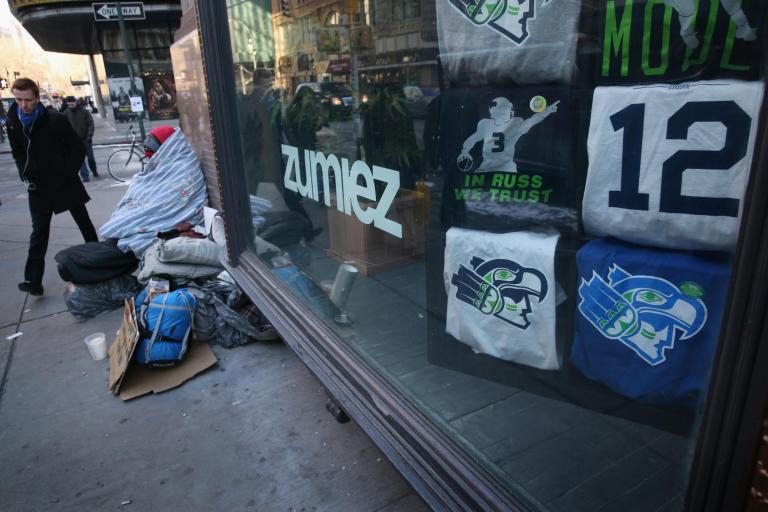
Seattle's homelessness crisis is getting worse – no amount of big tech philanthropy can undo Microsoft's damage

homeless-micosoft.jpg

The city’s housing problems must be understood in the context of how its richest residents, Bill Gates and Jeff Bezos, made their money

Source: https://www.independent.co.uk/voices/microsoft-seattle-homelessness-bill-gates-jeff-bezos-amazon-housing-crisis-philanthropy-a8741581.html
Droolin’ Dog sniffed out this story and shared it with you.
The Article Was Written/Published By: Andrew Buncombe


! #Headlines, #BusinessNews, #Equality, #Homeless, #Microsoft, #People, #Politics, #Trending, #News, #Newsfeed

Sunday, January 20, 2019

Microsoft pledges $500 million to help Seattle’s housing crisis

dims?crop=4724%2C2988%2C0%2C119&quality=Microsoft is putting its massive balance sheet to good use by pledging $500 million to help address the housing crisis in the greater Seattle area. According to The New York Times, it’s the most ambitious effort by a tech company to solve housing and…

Source: https://www.engadget.com/2019/01/17/microsoft-500-million-seattle-housing-crisis/
Droolin’ Dog sniffed out this story and shared it with you.
The Article Was Written/Published By:


! #Headlines, #BusinessNews, #Microsoft, #Politics, #TechNews, #News, #Newsfeed