Showing posts with label #BrowserWars. Show all posts

Sunday, February 21, 2021

How to Use Apple Maps in a Browser on Windows and Android

0-ddg.png?width=600&height=250&fit=crop&
Apple Maps is only officially available on Apple devices like iPhones and Macs. But, thanks to DuckDuckGo, you can browse or get directions in Apple Maps from any platform with a browser, including Windows and Android.

Read This Article on How-To Geek ›

Source: https://www.howtogeek.com/711986/how-to-use-apple-maps-in-a-browser-on-windows-and-android/
Droolin’ Dog sniffed out this story and shared it with you.
The Article Was Written/Published By: Tim Brookes


! #Headlines, #Android, #Apple, #BrowserWars, #Navigation, #Newsfeed, #TechNews, #TechnologyNews, #TechTips, #Windows, iphone android smartphone ipad, #News

Friday, February 19, 2021

Why Are My Microsoft Edge Tabs Faded? How to Turn off Sleeping Tabs

microsoft-edge-sleeping-tabs.png?width=6
Starting in version 88, Microsoft Edge automatically enables its Sleeping Tabs feature for all users. Wondering why some of your tabs are faded in the Edge toolbar? Here’s how the Sleeping Tabs feature works (and how to turn it off).

Read This Article on How-To Geek ›

Source: https://www.howtogeek.com/713905/why-are-my-microsoft-edge-tabs-faded-how-to-turn-off-sleeping-tabs/
Droolin’ Dog sniffed out this story and shared it with you.
The Article Was Written/Published By: Khamosh Pathak


! #Headlines, #Apps, #BrowserWars, #Microsoft, #Newsfeed, #TechNews, #TechSupport, #TechTips, #News

Tuesday, January 26, 2021

How to Change the Default Search Engine on Chrome

chrome_hero.jpg
Google develops the Chrome browser, but you don’t have to use Google’s search engine with it. You can choose from any number of search engines and make them the default. We’ll show you how to do it.

Read This Article on How-To Geek ›

Source: https://www.howtogeek.com/710159/how-to-change-the-default-search-engine-on-chrome/
Droolin’ Dog sniffed out this story and shared it with you.
The Article Was Written/Published By: Joe Fedewa


! #Headlines, #Apps, #BrowserWars, #Chrome, #Newsfeed, #Productivity, #Search, #TechNews, #TechSupport, #TechTips, #News

Wednesday, December 9, 2020

How to Uninstall or Disable Safari Extensions on Mac

Safari-User-on-Mac-Using-Extensions.png
Safari extensions add additional functionality to the browser. They function like mini-apps, and on the Mac, they are installed and behave as apps themselves. If you don’t want to use a Safari extension anymore, here’s how to uninstall it.

Read This Article on How-To Geek ›

Source: https://www.howtogeek.com/702758/how-to-uninstall-or-disable-safari-extensions-on-mac/
Droolin’ Dog sniffed out this story and shared it with you.
The Article Was Written/Published By: Khamosh Pathak


! #Headlines, #Apple, #Apps, #BrowserWars, #Mac, #Newsfeed, #Safari, #TechNews, #TechSupport, #TechTips, #News

Wednesday, May 13, 2020

Senate votes down anti-surveillance amendment, as both parties back warrantless spying on Americans’ browser history

The US Senate has voted down an amendment that would limit surveillance of Americans’ internet records. Apparently, the true divide in Washington is not between Democrat and Republican, but those for or against the police state.

The US Senate met on Wednesday to debate the reauthorization of some provisions of the USA Freedom Act, an expansive domestic surveillance bill that expired in March. As Majority Leader Mitch McConnell brought the Act to the floor, a bipartisan group of lawmakers introduced an amendment that would explicitly bar law enforcement from snooping on Americans’ internet browsing and search histories without a warrant.

Prior to the vote, McConnell had urged his colleagues to reject the amendment. When votes were cast on Wednesday, ten Democratic senators heeded McConnell’s words, bringing the final vote to 59 Yeas and 37 Nays. One more positive vote would have given the amendment the three-fifths majority it needed to pass.

Fifty-nine members of the Senate just voted in favor of my amendment to block warrantless government surveillance of Americans’ browser history. It failed by just one vote. McConnell is that much closer to giving Bill Barr the green light to spy on Americans’ private information. https://t.co/IV5ERbte48

— Ron Wyden (@RonWyden) May 13, 2020

The 10 Democrats who joined GOP in defeating amendment to stop FBI warrantless surveillance of web browser history: Carper, Casey, Feinstein, Hassan, Jones, Kaine, Manchin, Shaheen, Warner and Whitehorse. Joined 2 Republicans & a Democrat in not showing up to vote: Bernie Sanders

— jeremy scahill (@jeremyscahill) May 13, 2020

Former presidential candidate Bernie Sanders (I-Vermont) railed against the reauthorization of the USA Freedom Act in February, yet didn’t cast a vote on Wednesday. Online, commenters raged at the progressive kingpin for his absence. 

As someone who supports Sanders, this one hurts deep. There’s no excuse from anyone who didn’t vote or voted no. Now McConnell’s going to allow Barr to go commit fascist overwatch on our search histories.

— Tomiwa Onasoga (@TommyTheIllest) May 13, 2020

Yet surveillance is not a partisan issue. As often as Democrats are presented as the party of civil liberties and Republicans as the party of the ‘forever war’, the fault line isn’t between red and blue. While McConnell brought the Freedom Act before the Senate this week, it passed the Democrat-controlled House by 278-136 in March, completely free of any restricting amendments.

Moreover, the reauthorization was sponsored by Reps. Jerry Nadler (New York) and Adam Schiff (California), two Democrats who have disagreed with McConnell on almost everything, except the expansion of the surveillance state.

Among the Democrats who shot down the amendment was Dianne Feinsten (California), who has flip-flopped on surveillance throughout her three decades on Capitol Hill. Feinstein voted to extend the 9/11-era Patriot Act in 2012, and was a staunch defender of the National Security Agency’s warrantless wiretapping program, even after it was exposed by whistleblower Edward Snowden who she described as a “traitor” in 2013.

However, as Feinstein’s Senate Intelligence Committee was compiling a lengthy report into the CIA’s use of torture in 2014, the Californian senator and surveillance enthusiast voiced “grave concerns” that the agency was spying on her committee’s computers. Ironically, Feinstein declared at the time that “the CIA search may also have violated the Fourth Amendment, [and] the Computer Fraud and Abuse Act.”

Also on rt.com

A passenger wearing a protective face mask uses a phone at Helsinki International Airport in Vantaa, Finland, May 13, 2020 © Reuters / Vesa MoilanenThe snitch in your pocket: How Silicon Valley uses advertising tech to spy on your lockdown behavior

In fact, all ten Democrats who voted against the amendment on Wednesday voted in favor of the USA Freedom Act back in 2015, helping take it comfortably past one half majority in the Democrat-held Senate of the time.

Back to the present, senators also have two similar amendments to vote on Wednesday. The first, introduced by Mike Lee (R-Utah) and Patrick Leahy (D-Vermont) was passed 77-19. It would strengthen legal protections for suspects under federal surveillance. The second, authored by Rand Paul (R-Kentucky), would prohibit the Foreign Intelligence Surveillance Act (FISA) Court from authorizing spying on US citizens, as it did when the FBI surveilled the Trump campaign in 2016.

Think your friends would be interested? Share this story!

Source: https://www.rt.com/usa/488586-senate-blocks-surveillance-amendment/?utm_source=rss&utm_medium=rss&utm_campaign=RSS
Droolin’ Dog sniffed out this story and shared it with you.
The Article Was Written/Published By: RT


! #Headlines, #BrowserWars, #Congress, #Government, #Police, #Privacy, #RT, #Surveillance, #Trending, bernie sanders, new york nyc NY nypd nyfd, #News, #Newsfeed, #Politics, #Trump

Thursday, March 7, 2019

Google warns users to immediately update Chrome browser after critical bug discovered

Google warns users to immediately update Chrome browser after critical bug discoveredGoogle has warned owners of Windows and Mac computers to urgently update their Chrome internet browser after learning that hackers may have exploited a mystery bug that has existed since its launch. Justin Schuh, Chrome’s security engineer chief warned users to update Chrome “like right this minute” on Twitter, declaring it a “PSA [Public Service Announcement]”. The company shared a blog post in which it said an update that should fix the vulnerability, which it described as “high” in severity, had already been issued on March 1. It is up to users to update their browser. Those who are concerned can check their device is running the updated version of Google Chrome by opening a window and clicking on the three vertical dots in the right-hand corner.  Clicking “help”, followed by “about Google Chrome” in the drop down menu will lead to a page that will assist with updating. The bug was discovered by Clement Lecigne of Google’s Threat Analysis Group on February 27, Google said. Google said that the flaw was a “Use-After-Free”, which is a type of flaw that corrupts how a web app accesses a computer’s memory and can be used to install malicious software on a computer, causing it to crash or behave strangely. Google Chrome bug | How to fix it The flaw was located in Google’s FileReader, an application that is included in major browsers that lets the internet app access the contents of a PC. “We would also like to thank all security researchers that worked with us during the development cycle to prevent security bugs from ever reaching the stable channel,” said Abdul Syed, a Google Chrome engineer. Microsoft’s security chief raised eyebrows last month when he asked Windows PC owners to stop using Internet Explorer unless there was no other option. He claimed this was because it is no longer being updated – and therefore no longer being secured – by the company. Internet Explorer has issued a number of patches for “Use-After-Free” bugs in the past. Security researchers have for years been picking holes in Google and Microsoft’s apps, often in return for high sums of money as part of a “bug bounty”. Last year Facebook said it had paid one individual $50,000 for finding glitches in the social network’s code.

Source: https://news.yahoo.com/google-warns-users-immediately-chrome-060000982.html
Droolin’ Dog sniffed out this story and shared it with you.
The Article Was Written/Published By:


! #Headlines, #BrowserWars, #BugReport, #Cybersecurity, #Google, #Trending, #Newsfeed, #syndicated, news

Thursday, November 15, 2018

Firefox Will Now Alert You When You Visit Hacked Sites

wrb6mbcs0rcwmgrcev6m.png

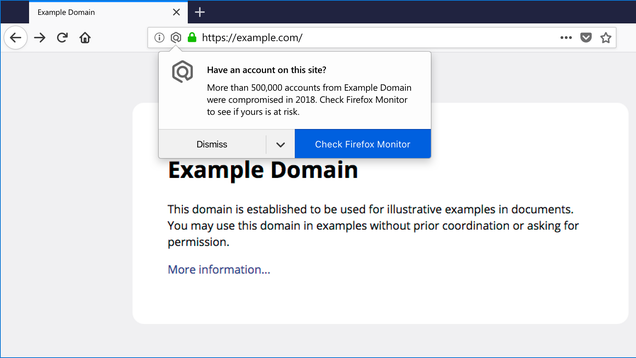
It can be hard to know if and when you might have been impacted by a data breach. That is, unless you’re a Firefox Quantum user. Today, Mozilla announced it’ll alert desktop users when they stumble upon a site that’s recently reported a breach.

Read more…

Source: https://gizmodo.com/firefox-will-now-alert-you-when-you-visit-hacked-sites-1830468019
Droolin’ Dog sniffed out this story and shared it with you.
The Article Was Written/Published By: Victoria Song


! #Headlines, #BrowserWars, #Internet, #TechNews, #TechnologyNews, PCH3lp, #News, #Newsfeed