Showing posts with label #Mac. Show all posts

Wednesday, April 14, 2021

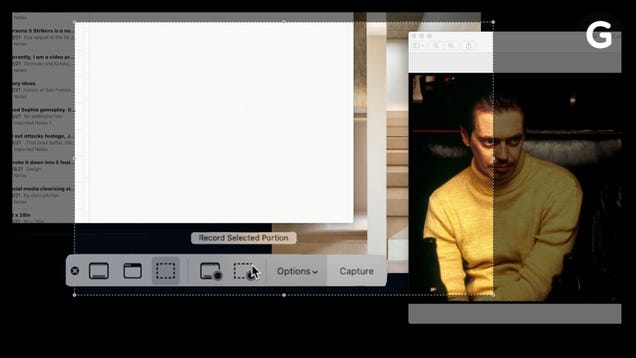
How to Take Screenshots on a Mac

affzr0pceqxf5pyrsui3.jpg

Taking a screenshot on your Mac might seem like basic computer knowledge, but there might be an even easier shortcut than what you’re used to.

Read more…

Source: https://gizmodo.com/how-to-take-screenshots-on-a-mac-1846684062
Droolin’ Dog sniffed out this story and shared it with you.
The Article Was Written/Published By: Caitlin McGarry


! #Headlines, #Computers, #Gizmodo, #Mac, #Newsfeed, #TechNews, #TechSupport, #News

Monday, March 29, 2021

How to Disable the “Empty Trash” Warning on a Mac

mac_empty_trash_warning_hero_1.jpg?width
While deleting files on a Mac, are you tired of warning prompts slowing you down? Would you like to empty the Trash at light speed? If so, it’s easy to turn off the warning you see when emptying the Trash on a Mac. Here’s how.

Read This Article on How-To Geek ›

Source: https://www.howtogeek.com/714198/how-to-disable-the-empty-trash-warning-on-a-mac/
Droolin’ Dog sniffed out this story and shared it with you.
The Article Was Written/Published By: Benj Edwards


! #Headlines, #Computers, #Mac, #Newsfeed, #TechNews, #TechTips, #News

Friday, January 8, 2021

How to Use Spotify Offline on a Windows 10 PC or Mac

spotify-offline-hero.png
Streaming music services offer a huge library of music, but only if you have an internet connection. However, Spotify can download music to listen to offline. Here’s how to take your music offline on Windows PCs and Macs.

Read This Article on How-To Geek ›

Source: https://www.howtogeek.com/704821/how-to-use-spotify-offline-on-a-windows-10-pc-or-mac/
Droolin’ Dog sniffed out this story and shared it with you.
The Article Was Written/Published By: Joe Fedewa


! #Headlines, #Apps, #Mac, #Music, #Newsfeed, #Spotify, #TechNews, #TechTips, #Windows, #News

Wednesday, December 9, 2020

How to Uninstall or Disable Safari Extensions on Mac

Safari-User-on-Mac-Using-Extensions.png
Safari extensions add additional functionality to the browser. They function like mini-apps, and on the Mac, they are installed and behave as apps themselves. If you don’t want to use a Safari extension anymore, here’s how to uninstall it.

Read This Article on How-To Geek ›

Source: https://www.howtogeek.com/702758/how-to-uninstall-or-disable-safari-extensions-on-mac/
Droolin’ Dog sniffed out this story and shared it with you.
The Article Was Written/Published By: Khamosh Pathak


! #Headlines, #Apple, #Apps, #BrowserWars, #Mac, #Newsfeed, #Safari, #TechNews, #TechSupport, #TechTips, #News

Wednesday, November 13, 2019

Holy crap, the maxed out 16-inch MacBook Pro costs $6,099

If you want a pro machine, you’ll have to pay top dollar for it. 

The new 16-inch MacBook Pro, announced Wednesday on Apple’s website, is the most powerful laptop the company has ever built. It starts at $2,399, but that price climbs fast as you start adding more options. 

If you tick all the boxes — which include a 2.4GHz, 8-core, 9th generation Intel Core i9 processor; 64GB of RAM; AMD Radeon Pro 5500M with 8GB of memory; and 8TB of SSD storage, the price jumps to an eye-watering $6,099. 

Yes, that much.

Image: Apple

As is typical for Apple, memory and storage options add the most to the price. 32GB of memory will cost you $400 extra, while 64GB of memory will cost $800 extra. For storage, a 2TB SSD costs $400 on top of the base price, a 4TB SSD costs $1,000, and adding an 8TB SSD will set you back $2,200.  Read more…

More about Apple, Macbook Pro, Tech, and Big Tech Companies

Source: https://mashable.com/article/macbook-pro-16-inch-maxed-out-price/
Droolin’ Dog sniffed out this story and shared it with you.
The Article Was Written/Published By: Stan Schroeder


! #Headlines, #Apple, #Mac, #Mashable, #TechNews, #Newsfeed, #syndicated, news

Tuesday, July 9, 2019

Webcam flaw lets hackers spy on people through Mac video conference app Zoom

apple-mac-webcam-hack-zoom.jpg

More than 4 million webcams are at risk to the security flaw

Source: https://www.independent.co.uk/life-style/gadgets-and-tech/news/webcam-hack-zoom-app-mac-apple-spy-macbook-a8997141.html
Droolin’ Dog sniffed out this story and shared it with you.
The Article Was Written/Published By: Anthony Cuthbertson


! #Headlines, #Apple, #Apps, #BugReport, #Hackers, #Mac, #Malware, #Privacy, #Trending, #Newsfeed, #syndicated, news

Wednesday, April 17, 2019

How to Turn Your Mac’s Caps Lock into an Extra Modifier Key

Mac Caps Lock KeyNick Beer / Shutterstock

Unless you’re prone to yelling on the Internet, you probably don’t use Caps Lock for much. That’s weird since it’s right next to a bunch of useful modifier keys. Here’s how to make Caps Lock as handy as the others.

What Can You Do With an Extra Modifier Key?

Perhaps the coolest thing to do is bind fully custom hotkeys. With the use of an app like BetterTouchTool, you can use an extra modifier key to add an empty slate of hotkeys to which you can attach actions. If you want to trigger a shell script or open a new email tab whenever you press Caps+B, you can do that.

You can do the same custom hotkeys without Caps Lock, but you’ll be stuck pressing weird combinations like Shift+Control+Command to not interfere with default shortcuts. With this method, any app that allows you to set your own hotkeys will support the new Caps Lock modifier.

You can also rebind existing shortcuts to use Caps Lock. If there’s an overly complicated shortcut that’s bugging you, you can rebind it in macOS’s keyboard settings to make it easier to press. For example, the hotkey in macOS to take a screenshot of a selection is Shift+Command+5, but you could rebind it to Caps+S.

Repurpose Caps Lock With Karabiner

Now, there’s no way to emulate an extra modifier key properly, so for compatibility reasons, a better way to get this functionality is to remap Caps Lock to act like you’re pressing the Shift, Control, Option, and Command keys at the same time. Since this is such an absurd combination, no app is going to require you to press every one of them for a hotkey, and there should be no interference.

This does mean you’ll lose out on combinations such as Caps Lock+Command, but it should work simply enough with any other alphanumeric key. You can remap Caps Lock to an extra function key, like the F13-20 keys, but it may not work as a hotkey in every app. You can also natively remap the Caps Lock key to Escape (or any other modifier key), but this doesn’t add any extra functionality; it just relocates the key.

RELATED: How to Get Your Mac’s Esc Key Back by Remapping Caps Lock

The app we’ll use to rebind Caps Lock is Karabiner, a free keyboard remapping tool for macOS. Download and install the app, and open the preferences. Under the “Complex Modifications” tab, add a new rule with the button at the bottom.

macOS Karabiner Elements

Read the remaining 10 paragraphs

Source: https://www.howtogeek.com/409904/how-to-turn-your-mac%E2%80%99s-caps-lock-into-an-extra-modifier-key/
Droolin’ Dog sniffed out this story and shared it with you.
The Article Was Written/Published By: Anthony Heddings


! #Headlines, #Apple, #Mac, #Productivity, #TechNews, #TechTips, #Newsfeed, #syndicated, news
Thursday, January 3, 2019

Apple has problems and there’s no easy fix

More and more expensive iPhones which last longer, an increasingly competitive smartphone segment, and shakiness in the Chinese market have helped sent Apple’s stock price plummeting today. The Cupertino firm issued a rare warning yesterday that its profits for Q1 2019 would be lower than expected, blaming fewer than expected sales of its star product as one of the key … Continue reading

Source: https://www.slashgear.com/apple-iphone-sales-slump-2019-innovation-china-strategy-03559791/
Droolin’ Dog sniffed out this story and shared it with you.
The Article Was Written/Published By: Chris Davies


! #Headlines, #Apple, #BusinessNews, #iPhone #iPad, #Mac, #Money, #TechNews, #TechnologyNews, #News, #Newsfeed